
Table of Contents
ToggleIf you’re spending eight hours a day hunched over a traditional desk, your back probably isn’t thanking you. Standing desk converters have become the practical solution for remote workers and office employees who want to alternate between sitting and standing without replacing their entire desk setup. Unlike a full standing desk, a converter sits on top of your existing workspace, no installation, no mess, just the ergonomic benefits when you need them. Whether you’re dealing with lower back pain or simply looking to add movement to your workday, finding the best standing desk converter for your space means understanding what separates a quality option from a flimsy one that’ll end up collecting dust in the closet.
Key Takeaways
- The best standing desk converter balances stability, height range, and adjustment ease to prevent it from becoming an unused desk accessory.
- A quality standing desk converter should have a weight capacity of at least 75–100 pounds and a wide, stable base to support daily use without wobbling.
- Gas spring converters offer the sweet spot between affordability and functionality, providing smooth, effortless adjustments ideal for frequent position changes throughout the day.
- Proper ergonomic setup—with elbows at 90 degrees and monitor at eye level—is essential to avoid neck and shoulder strain when using your standing desk converter.
- Alternating between sitting and standing every 20–30 minutes maximizes the health benefits of a standing desk converter while preventing fatigue and maintaining productivity.
What Makes a Standing Desk Converter Worth the Investment
A standing desk converter isn’t just about looking busy, it’s about actually improving how you work. Switching between sitting and standing throughout the day reduces fatigue, cuts down on circulation issues, and can ease the strain on your neck and shoulders that comes from being locked in one position. The beauty of a converter is that it handles the job without requiring you to buy an expensive motorized desk or rearrange your entire office.
The key difference between a cheap converter and a solid one comes down to stability and how smoothly it transitions. A wobbly converter will make typing feel unstable and can encourage poor posture as you try to compensate. You’re also investing in durability, a quality converter should handle daily up-and-down cycles for years without sagging or wobbling. Since you’re probably using this multiple times a day, it needs to be reliable.
Key Features to Compare Before Buying
Before you start comparing models, focus on the specs that actually matter for your setup. The wrong converter won’t work, no matter how good the reviews are.
Height Range and Adjustability
Height range is non-negotiable. Most standing desk converters raise your workspace between 5 and 20 inches, but some do less and some do more. You need enough lift to get your monitor and keyboard to proper standing height, roughly 29 to 30 inches from the floor to your keyboard surface. If you’re particularly tall or short, pay close attention here. Some converters use manual lever systems for quick adjustments, while others have gas springs for smoother, easier transitions. Gas springs are gentler on your wrists and require less effort, which matters if you’re adjusting multiple times a day.
Weight Capacity and Stability
Weight capacity seems straightforward but gets ignored too often. A 50-pound converter might sound like plenty until you’re loading it with a monitor, keyboard, mouse, and a few desk items. Check the actual capacity, 75 pounds is a decent baseline, 100+ is better. Stability matters just as much. A converter with a narrow base will feel tippy when you lean on it or when weight shifts during typing. Look for converters with wide feet or cross-braced frames, these are less likely to rock back and forth while you’re working at standing height.
Top Standing Desk Converter Options for Different Needs
The market has legitimate options across different budgets and needs. Independent testers have evaluated multiple converters, and the standouts generally fall into a few categories.
Manual lever converters are the budget-friendly starting point. They’re simple, lightweight, and don’t require power. You raise or lower with a handle, which takes maybe five seconds. The trade-off is that repeated raising and lowering requires a bit of arm strength, and the motion is jerky rather than smooth. These work well if you’re adjusting once or twice a day.
Gas spring converters smooth out that adjustment. You push up or pull down with minimal effort, and the movement feels controlled. They cost more than manual levers but are still under most full-desk options. This is where most people find the sweet spot, steady, reliable, and practical for frequent adjustments. Reviews from equipment testing sites like CNET’s standing desk converter guide consistently highlight gas spring models as the most user-friendly.
Electric converters are the premium option. A motor does the work, and you just press a button. Some even have preset heights so you can jump between sitting and standing positions instantly. The downside is weight, price, and you need to find an outlet. For most home offices, electric feels like overkill unless you’re adjusting fifteen times a day.
Consider converters from Tom’s Guide’s testing of standing desk options if you want hands-on reviews of popular models and their real-world performance in typical home office setups.
How to Install and Use Your Converter Effectively
Installation is usually straightforward, but a few minutes of care prevents headaches later. Most converters arrive fully assembled or require simple assembly of feet and arm supports.
Before setting up: Clear your desk and assess what’s actually going on it. You’ll need to move everything to make room for the converter base. Measure from the front edge of your desk to the back to confirm the converter will fit, depth is often the limiting factor.
Placement matters. Center the converter on your desk so weight distributes evenly. A converter jammed to one side will feel unstable and can tilt. Make sure your monitor, keyboard, and mouse all fit on the converter platform without hanging off edges, anything hanging off shifts the center of gravity and compromises stability.
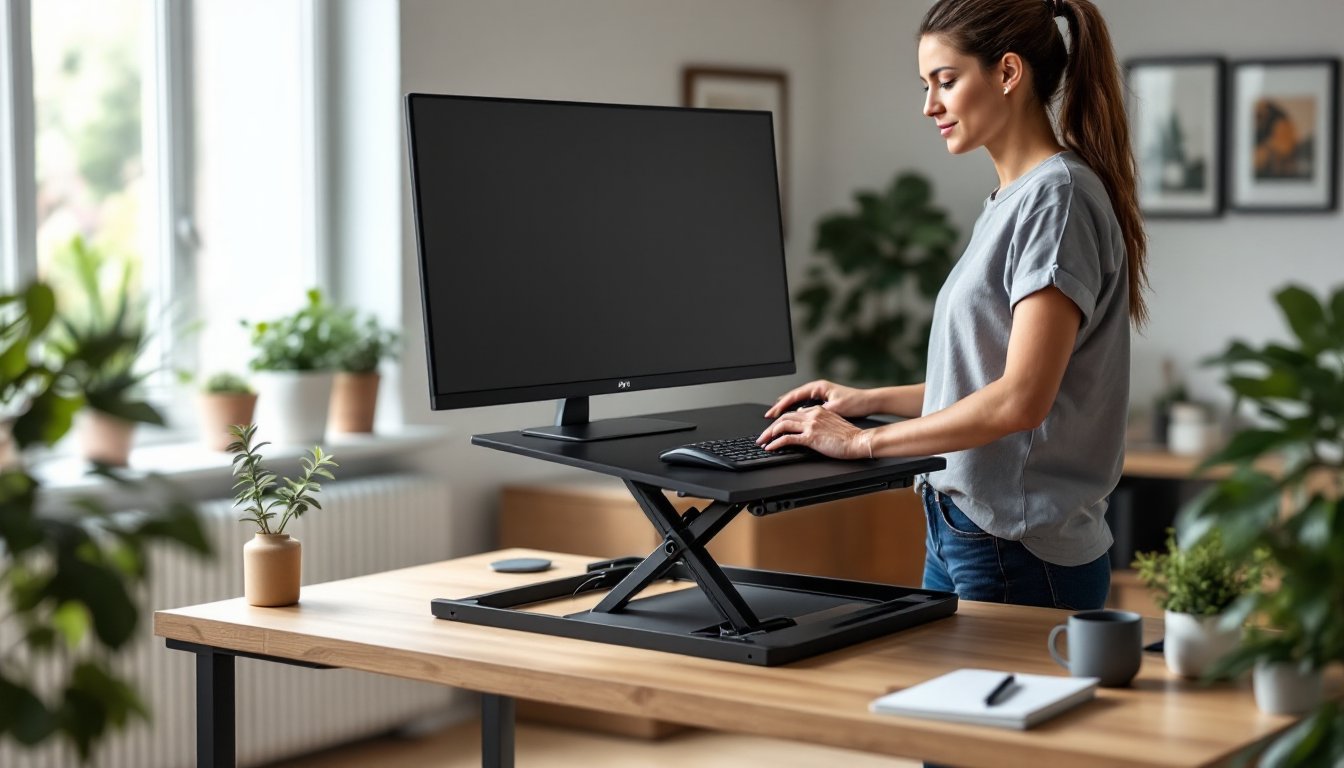
Adjust the height for your body. When standing, your elbows should be at roughly 90 degrees with your forearms parallel to the floor. Your monitor should be at eye level when you’re looking straight ahead. If you have to crane your neck or hunch your shoulders, adjust the converter height or reposition your monitor. Getting this right prevents neck and shoulder strain.
Don’t sit and stand randomly throughout the day. The benefit comes from alternating on a schedule, try 20 to 30 minutes standing, then sit again. This prevents fatigue and keeps movement manageable. Some people use a timer to remind them to switch. Resources like Digital Trends’ converter reviews offer detailed guidance on ergonomic setup and usage patterns.
Keep weight distribution balanced. Don’t pile everything on one side of the converter. Spread monitors, peripherals, and desk items across the platform so the load stays centered. This is especially important if you’re at or near the weight capacity.
Conclusion
The best standing desk converter is the one you’ll actually use. Prioritize stability, height range that fits your body, and adjustment ease, these factors determine whether it becomes a regular part of your workday or an unused desk topper. A solid converter removes the excuse to stay seated all day and costs far less than replacing your entire desk setup. Measure your space, check your weight requirements, and pick one that matches how often you’ll adjust. Your back will feel the difference within a week.